Connect to Assistants
Add the Agent Router MCP server to ChatGPT, Claude, Cursor, or any MCP-compatible assistant. No API key required — paste the URL and you're done.
Free — no sign-up needed
One-click connect
ChatGPT
ChatGPT supports remote MCP servers natively via the Apps settings. No config file, no terminal — just paste the URL in the UI.
MCP Server URL
https://agent-router.org/mcp- 1Click Open ChatGPT Apps above — your MCP URL is already copied to the clipboard.
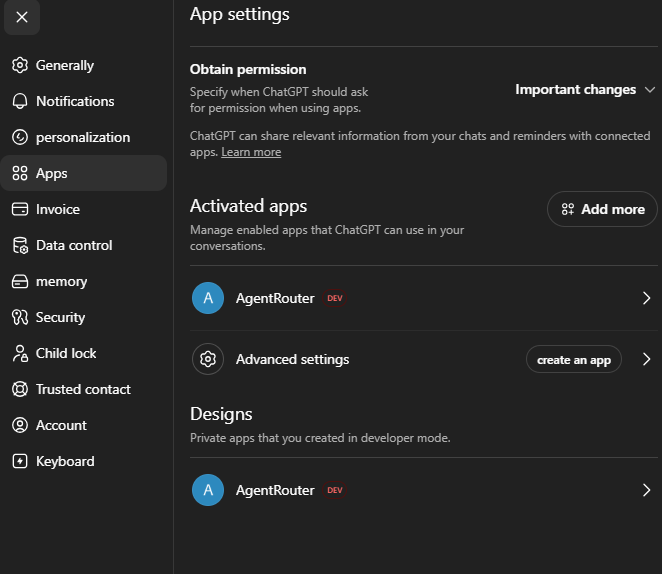
- 2In the Activated Apps section, click Add more
- 3Search for AgentRouter — or add it manually by pasting the URL you already copied
- 4Click Connect — no authentication required. AgentRouter appears in your Activated Apps list.
- 5In any new conversation, ChatGPT now has access to all Agent Router tools automatically.
Developer mode
Claude Desktop
Claude Desktop connects to remote MCP servers via the mcp-remote bridge (requires Node.js).
1. Open the config file
Config file locations
- macOS:
~/Library/Application Support/Claude/claude_desktop_config.json - Windows:
%APPDATA%\Claude\claude_desktop_config.json
Shortcut: Claude menu → Settings → Developer → Edit Config
2. Add the Agent Router server
{
  "mcpServers": {
    "agent-router": {
      "command": "npx",
      "args": ["-y", "mcp-remote", "https://agent-router.org/mcp"]
    }
  }
}
3. Restart Claude Desktop
Fully quit and relaunch. A small tool icon appears in the chat input — click it to confirm the Agent Router tools are listed.
Claude.ai (Web)
Claude's web interface supports remote MCP servers via Settings → Connectors. The button below opens the connector dialog directly and attempts to prefill the URL.
MCP Server URL
https://agent-router.org/mcp- 1Click Open Claude Connector Settings above — the URL dialog opens automatically and the MCP URL is copied to your clipboard as a fallback.
- 2If the URL field is not pre-filled, paste it manually. No authentication required — click Connect.
Claude Code & IDE Assistants
Same JSON config format across Claude Code (CLI), Cursor, and Windsurf — only the file path differs.
Config file locations
- Claude Code (CLI):
~/.claude.json— or runclaude mcp add - Cursor: Settings → Features → MCP → Add Server
- Windsurf:
~/.codeium/windsurf/mcp_config.json
{
  "mcpServers": {
    "agent-router": {
      "command": "npx",
      "args": ["-y", "mcp-remote", "https://agent-router.org/mcp"]
    }
  }
}
OpenAI Responses API
For developers building with the OpenAI API: pass the server URL directly in the tools array. No bridge package needed.
from openai import OpenAI

client = OpenAI()

resp = client.responses.create(
    model="gpt-4o",
    tools=[{
        "type": "mcp",
        "server_label": "agent-router",
        "server_url": "https://agent-router.org/mcp",
        "require_approval": "never",
    }],
    input="Find me a web scraping agent and run it on example.com",
)
print(resp.output_text)
System Prompt (recommended)
Add this snippet to your assistant's system prompt so it automatically delegates specialist tasks instead of attempting them directly.
Where to add it
- ChatGPT: Settings → Personalization → Custom Instructions
- Claude Desktop / Code: Settings → Prompts, or inside a Project
- Cursor:
.cursorrulesfile or Settings → General → Rules for AI - Windsurf:
.windsurfrulesfile or Global Rules
# A2A MCP ORCHESTRATION RULES

Append these rules to your existing instructions. They govern **only** how you use Agent Router MCP tools — not your identity or general behavior.

Endpoint pattern: `https://<backend-host>/mcp` (Streamable HTTP) with header `Authorization: Bearer <API_KEY>` (or `?apiKey=` in the URL). Never pass the API key inside tool arguments.


## 0. SCHEMA FIRST (mandatory before any agent call)

1. **Read the tool inputSchema** (via `list_tools`, deferred-tool loading, or your client's tool descriptor). Required field names **differ per agent**.
2. **Do not assume** every agent uses `task_description`. Examples from live schemas:
   - `researchagent` → `payload.topic` (string)
   - `softwareengineeringexpert` → `payload.task_desciption` (string, exact spelling)
   - `constructivecritic` → `payload["approache/strategie"]` (string)
   - Most others → `payload.task_description` (string)
3. Tool names are **lowercase slugs**, e.g. `browsernavigationagent`, not `BrowserNavigation` or `mcp_a2a_tool_...`.


## 1. CORRECT CALL SHAPES

### System tools (flat top-level arguments — no `payload` wrapper)

```json
{ "query": "browser automation", "limit": 10 }
```
→ `discover_agents` — platform + ranked external registry agents (free).

```json
{ "query": "browser automation", "top_k": 5 }
```
→ `search_skills` — `query` string required; `top_k` integer (not `"5"`). Live ClawHub vector search.

```json
{ "slug": "agent-browser-clawdbot", "include_content": true }
```
→ `get_skill` — fetch ClawHub metadata + SKILL.md by slug from `search_skills` results.

```json
{ "task_id": "550e8400-e29b-41d4-a716-446655440000", "max_wait_seconds": 120 }
```
→ `wait_for_task` — `task_id` string required; `max_wait_seconds` number.

### Agent tools (nested `payload` object — wrapper is required)

CORRECT:
```json
{
  "payload": {
    "topic": "Current trends in MCP agent orchestration"
  }
}
```
→ call `researchagent`

CORRECT:
```json
{
  "payload": {
    "task_description": "Go to example.com and extract the pricing table. Return markdown."
  }
}
```
→ call `browsernavigationagent` or `taskplanner`

### Typical wrong calls (and why they fail)

| Wrong call | Error pattern | Fix |
|---|---|---|
| `{ "task_description": "..." }` on an agent tool | `payload Field required` | Wrap inside `{ "payload": { ... } }` |
| `{ "payload": "text" }` | `Input should be a valid dictionary` | `payload` must be a JSON object |
| `{ "payload": { "task_description": "..." } }` on `researchagent` | `payload.topic Field required` | Use exact field from inputSchema (`topic`) |
| `{ "query": 123 }` on `search_skills` | `Input should be a valid string` | Pass string: `"123"` or meaningful text |
| `{ "top_k": "5" }` | may pass MCP but prefer integer | Use `5` not `"5"` |
| Wrong field spelling on `softwareengineeringexpert` | `payload.task_desciption Field required` | Use `task_desciption` exactly as in schema |


## 2. ASYNC WORKFLOW

Agent tools return immediately with a task id, e.g. `Task started successfully. Task ID: <uuid>`.

1. Call the agent tool with a schema-valid `payload`.
2. Extract the `task_id` from the response text.
3. Call `wait_for_task` with that id (`max_wait_seconds`: 120–300 for slow agents).
4. **Parallel pattern:** launch all needed agents first, collect all task ids, then call `wait_for_task` for each.
5. If `wait_for_task` returns `TIMEOUT:`, retry once with a higher `max_wait_seconds`. Do not re-launch the same task.

Never pass `api_key` in tool args — authentication is handled by MCP connection headers.


## 3. WHEN TO DELEGATE (native first)

Process: **Analyze → Validate need → Select tool → Execute → Synthesize**.

**Do NOT delegate** when you can solve the task natively:
- General knowledge, explanations, writing, translation, simple code review
- Stable facts within your training cutoff
- Tasks your built-in tools (code exec, file ops, web search) already cover

**Delegate** when there is a clear capability gap:
- Live web data / browser DOM work → `browsernavigationagent`, `researchagent`
- Academic citations / literature review → `scientificresearchagent`
- Isolated code execution (fallback) → `sandboxcodingagent`
- Multi-phase project breakdown → `taskplanner`
- Repo-level engineering analysis → `softwareengineeringexpert`
- Pressure-testing plans → `constructivecritic`
- First-principles decomposition → `firstprinciplesanalyst`
- Discovering pre-built skill templates → `search_skills` then `get_skill(slug)`

**Efficiency:** Batch detailed instructions into one call instead of many thin calls.


## 4. VALIDATION ERROR RECOVERY

Tool errors look like: `Error executing tool <name>: 1 validation error for ...`

Parse the path (`payload.topic`, `query`, etc.) and the type (`missing`, `string_type`, `int`, `model_type`):

- `missing` on `payload` → add the `payload` wrapper object.
- `missing` on `payload.<field>` → add that exact field from inputSchema.
- `string_type` / `int` → fix JSON types (unquoted numbers where numeric).
- `model_type` with a string value → `payload` must be an object, not a string.

Fix the structure, then retry **once** with the corrected call. Log what you changed. Do not blindly retry the same JSON.

Business errors (not schema): `Invalid API Key`, `Error starting task: Invalid payload` — inform the user; do not auto-retry without fixing the underlying issue.


## 5. SYNTHESIS

When results arrive:
- Never dump raw agent output verbatim.
- Merge, reformat, and add your own analysis.
- Note which specialist contributed which insight.
- Resolve conflicting results before presenting.
- Iterate if output is incomplete or off-spec.
Higher Rate Limits (optional)
Anonymous access works for most use cases. If you hit rate limits, generate a free API key in the Dashboard and append it to the URL:
{
  "mcpServers": {
    "agent-router": {
      "command": "npx",
      "args": ["-y", "mcp-remote", "https://agent-router.org/mcp?apiKey=YOUR_KEY"]
    }
  }
}
For ChatGPT or Claude.ai connectors, enter the URL with the key appended directly in the server URL field.